realmeparts

How to find installed apps in realme smart TV?

20,869 views
11 likes
Official Source
tv

【Step 1】 Long press the home button of the remote control to enter the APPS list page and select AI PONT or Desktop Favorites list. Move right to select AI PONT. 
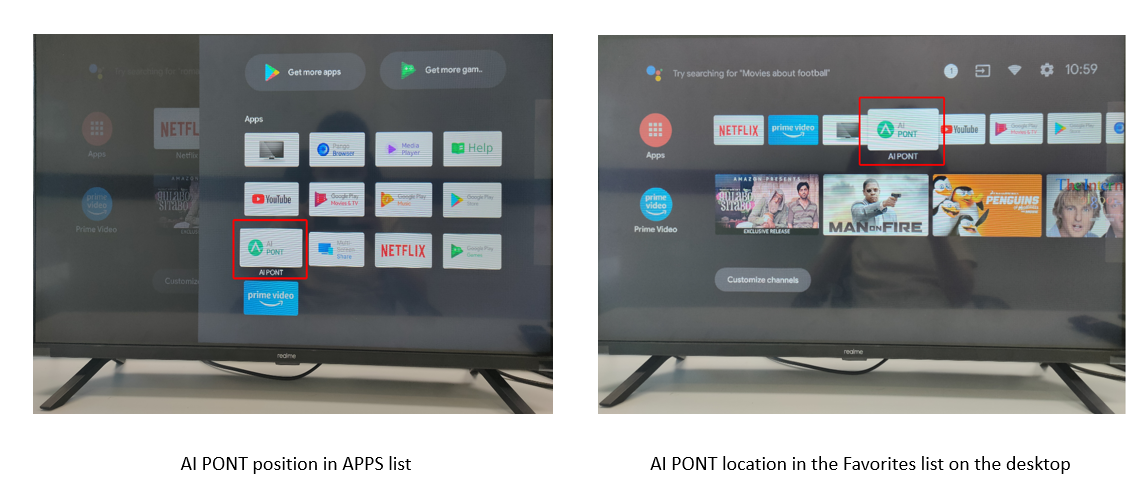
find installed apps in realme smart tv

【Step 2】 Open the AI PONT, enter the AI PONT interface, and you can find the installed application
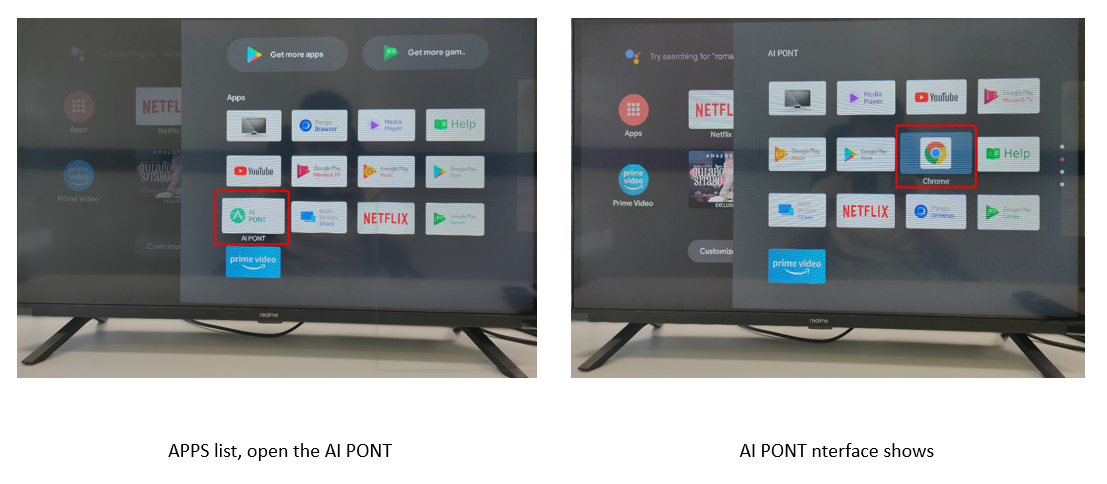
AI POINT interface


Related Articles:

Setup guide for realme Smart TV

How to reset realme Smart TV?


Article Reference

Official Realme documented guide #2048633

View on realme.com

Related Topics

#realme smart TV#installed apps in realme smart TV#find apps installed in realme smart TV#realme smart TV apps installed

Was this article helpful?

Your feedback helps us improve our support content.

Still need help?

Explore more articles or contact our customer support team for personlized assistance.

Visit Support Hub