realmeparts

How to fix fingerprint option is currently unavailable in Windows 11?

37,584 views
68 likes
Official Source
laptop

If you can’t use the fingerprint reader, make sure the Credential Manager service is set to Automatic.


1. Click on the Search icon, and type services.msc.

2. Double-click on the Credential Manager.

3. Set the startup type to Automatic.
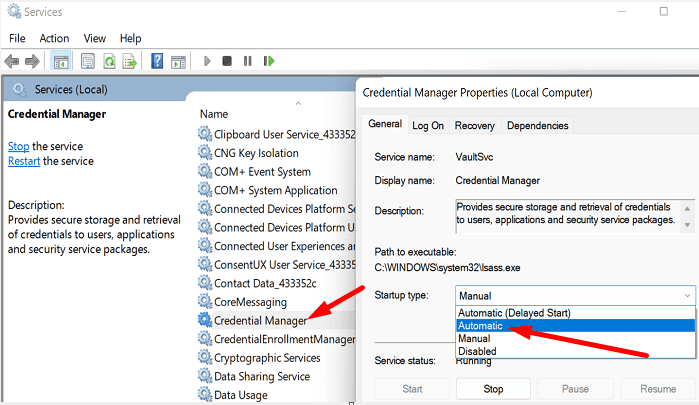
credential manager setting

4. Then, click on the Log On tab.

5. Select Log On AsLocal System Account.

6. Tick the checkbox that says Allow service to interact with desktop
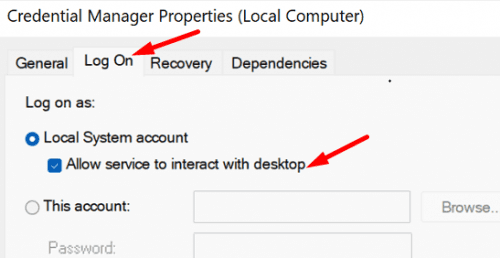
Allow service to interact with desktop

7. Save the settings, and restart your computer.


If the problem persists after following these recommendations, please back up your data and visit the nearest realme service center for further assistance.


Article Reference

Official Realme documented guide #2096104

View on realme.com

Related Topics

#Windows 11 fingerprint not working#Windows Hello not recognizing fingerprint#troubleshoot fingerprint sensor Windows 11#issue with Windows Hello in Windows 11

Was this article helpful?

Your feedback helps us improve our support content.

Still need help?

Explore more articles or contact our customer support team for personlized assistance.

Visit Support Hub