As the notebook BIOS update has a certain degree of risk, if conditions permit, it is recommended that you go to the after-sales service.
If you want to update the BIOS of your computer by yourself, you can refer to the following solutions:
Ready to work:
Plug in the computer's charger and ensure that the remaining battery power is greater than 20%. Before updating the BIOS, be sure to back up your important data and transfer it to other storage devices.
Upgrade steps:
1. Enter the download page of the official website, select your laptop model, enter the driver download page to find the BIOS, and click to download;
2. After downloading the BIOS file, unzip the file. If you are afraid that the unzipped file cannot be found, it is recommended to unzip the file to the desktop,
3. Find the file with the exe suffix, and double-click to run it.
4. Double-click to run this application, click "Yes" to enter the next step.
5. A pop-up prompting BIOS upgrade risk description, if you are sure to update, please click "OK" to enter the next step.
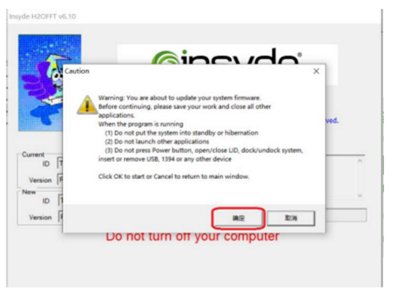
6. The computer restarts automatically and enters the refresh phase. Please do not do any operations on the computer during this process.
7. After the update is completed, the computer automatically restarts and the update is complete.