1. Function Introduction
It can erase everything and settings, and restore the TV to default settings.
2. Operation and path
Reset Method for TV using Android 9 & 10 System
Applicable for realme Smart TV Full HD 80cm(32") (Black), realme Smart TV 4K 126cm(50"), realme Smart TV 4K 108cm(43"),
realme Smart TV 108cm (43"), realme Smart TV 80cm (32"), realme Smart TV SLED 4K 139cm (55")
Path: Settings >Device Preferences >Reset > Reset > Erase everything
Reset Method for TV using Linux System (realme smart TV Neo 32''):
UI 1.0: Settings >Setup >Restore Default > Confirm
UI 2.0: Press the Menu  button on the remote > Setting > General Settings > Restore default > Select Confirm to reset the TV.
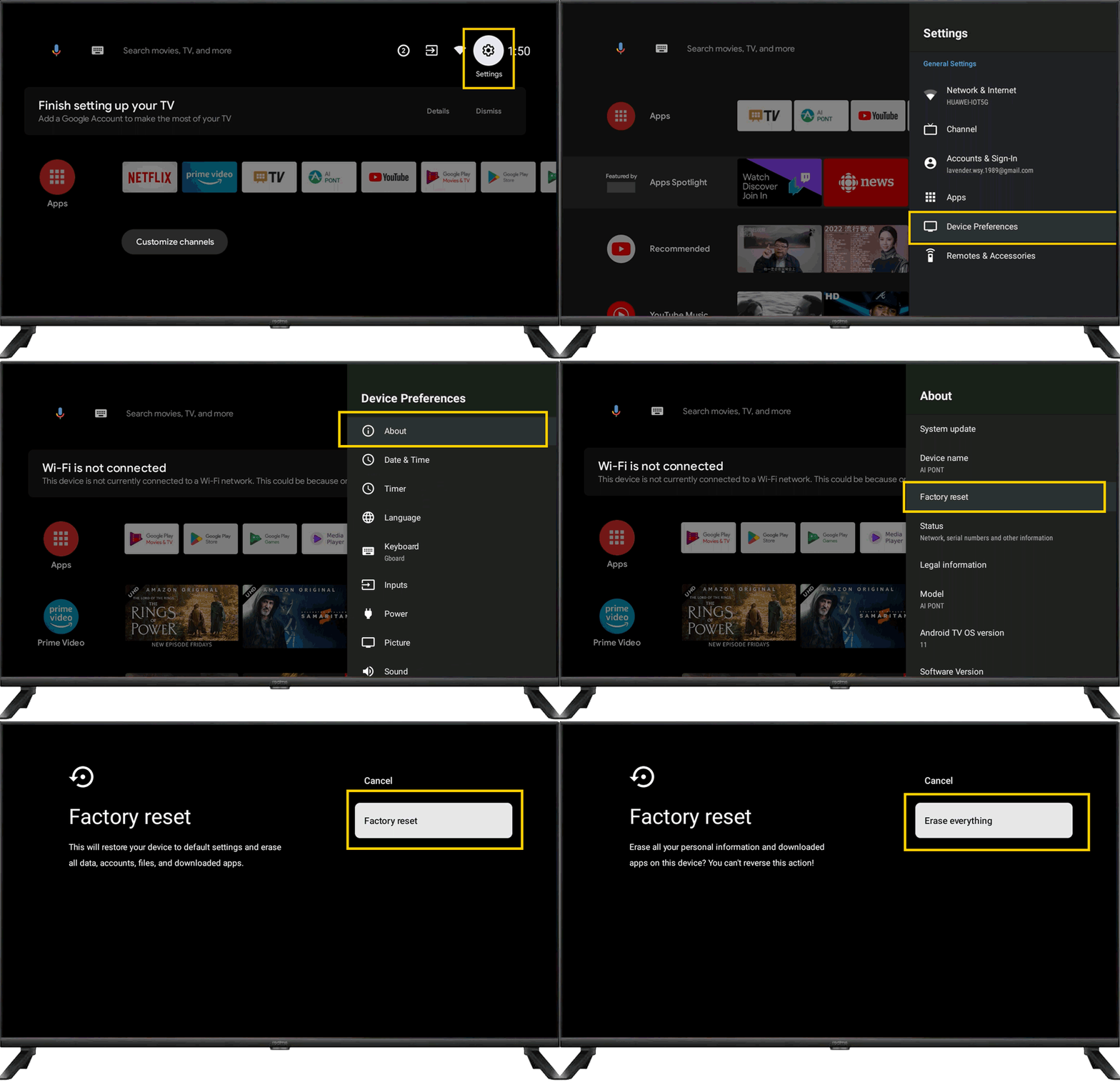
Reset Method for TV using Android 11 System
Applicable for realme Smart TV X Full HD 100cm 40" &realme Smart TV X Full HD 103cm 43"
Path: Settings > Device Preferences > About > Factory reset > Factory reset > Erase everything.