Problem Phenomenon:
1. The incoming call was not received
2. Incoming calls failing
3. Incoming calls delay.
4. Do not get any notification if any other person calls me at the same time.
Solution:
1. Please check whether the network is good on the device.
2. Ensure a valid data pack is available for incoming calls. If not, please recharge or check with the operator.
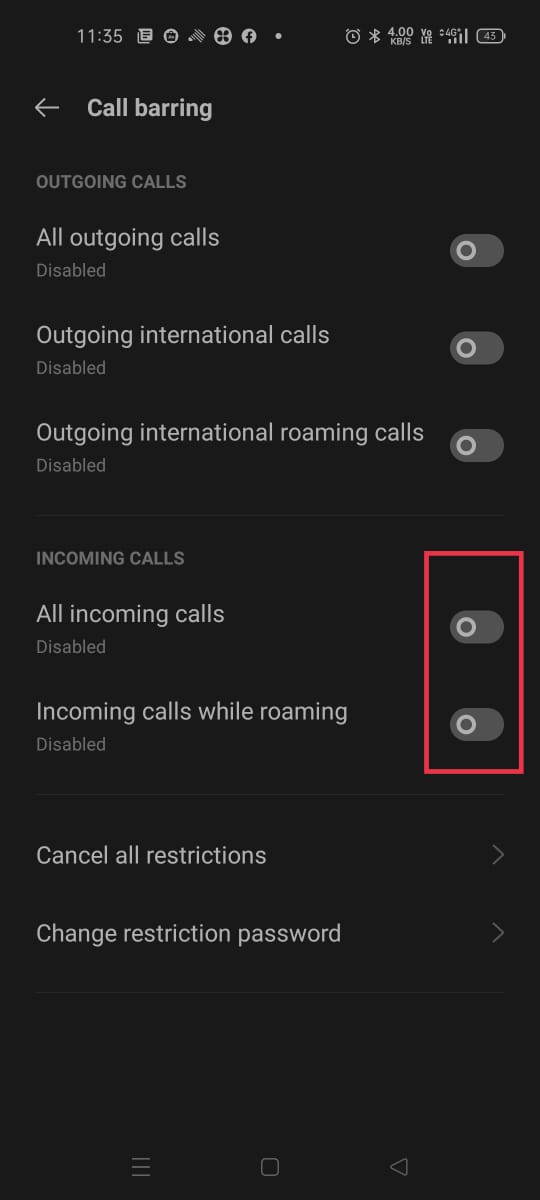
3. Check whether the incoming calls are barred. To check and disable please follow the below steps:
realme UI 3.0 & above settings: Open the Phone app 

realme UI 2.0: Open the Phone app
realme UI R & Go & S & T: Open the Phone app
.
4. Please ensure the SIM status is enabled on the device. To check the Enable status please follow the below steps:
realme UI 3.0 & above versions: Settings > Mobile Network > Select SIM > Enable > " Enable " should be activated.
realme UI 2.0: Settings > SIM Card & Mobile Data > Select SIM > Enable > " Enable " should be activated.
realme UI R & Go & S & T: Settings > Network & internet > Internet > Select SIM > Use SIM.
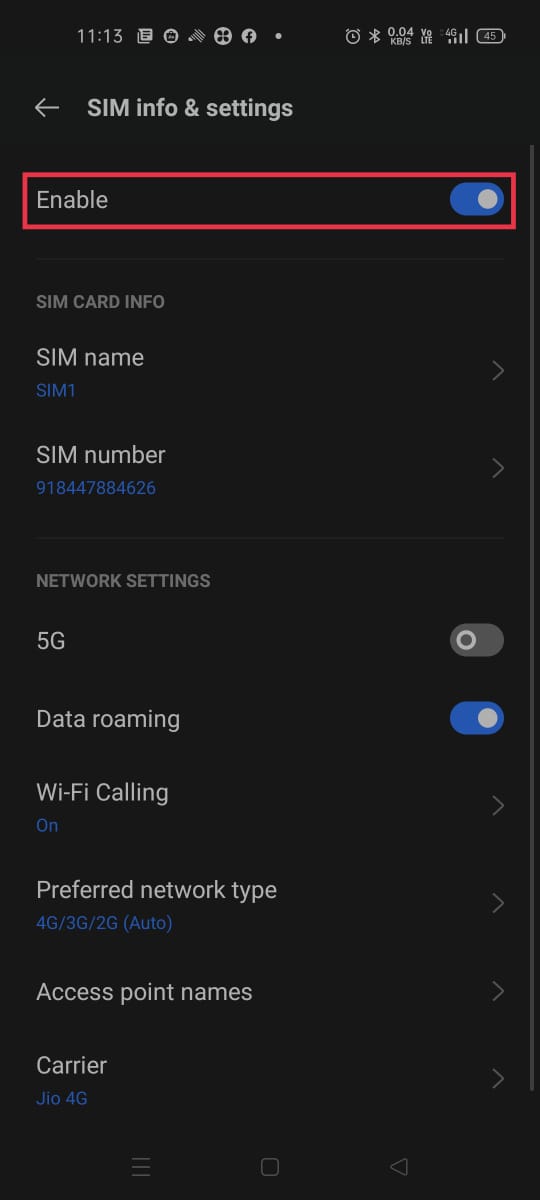
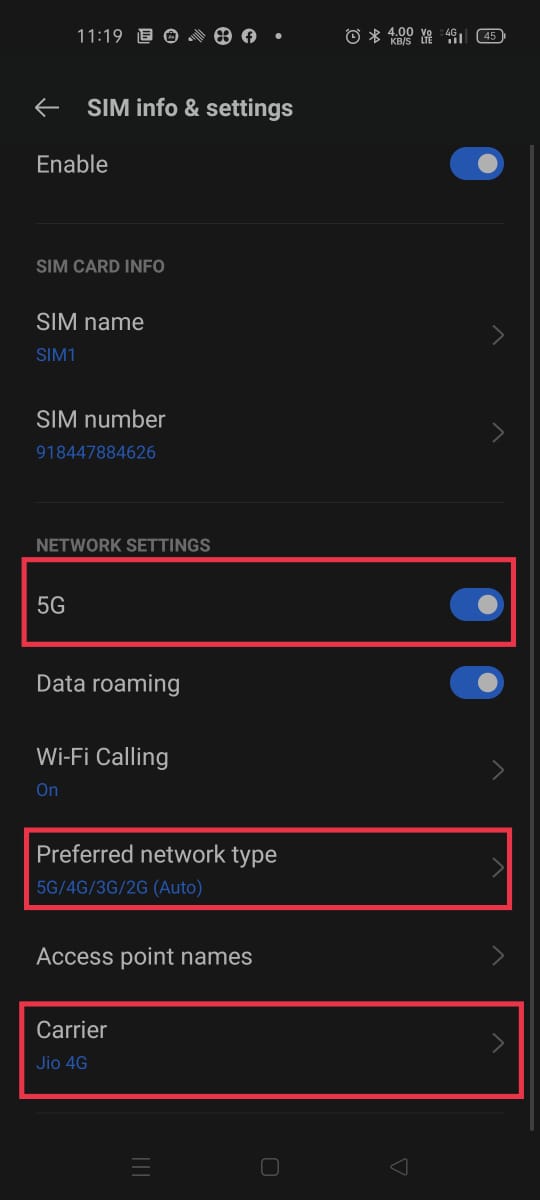
5. Please check the network setting and enable:
realme UI R & Go & S & T:
Automatically select network: Settings > Network & internet > Internet > Select SIM > Automatically select network
4G/3G/2G (Auto): Settings > Network & internet > Internet > Select SIM > Preferred Network type
realme UI 2.0 :
Carrier Auto Select: Settings > SIM Card & Mobile Data > Select SIM > Carrier > Enable Auto Select.
5G/4G/3G/2G (Auto): Settings > SIM Card & Mobile Data > Select SIM > Preferred Network type: Select 5G/4G/3G/2G (Auto).
Note: If "5G/4G/3G/2G (Auto) " Not available please select 4G/3G/2G (Auto)
VoLTE: Settings > SIM Card & Mobile Data > Select SIM > Enable : VoLTE Calls.
Note: If VoLTE is not available please enable 5G.
realme UI 3.0 & above versions:
Auto Select: Settings > Mobile network > Select SIM > Operator > Enable Auto Select.
5G/4G/3G/2G (Auto): Settings > Mobile network > Select SIM > Preferred Network type: Select 5G/4G/3G/2G (Auto).
Note: If "5G/4G/3G/2G (Auto) " Not available please select 4G/3G/2G (Auto).
VoLTE: Settings > Network Setting > Select SIM > Enable : VoLTE Calls.
Note: If VoLTE is not available, please enable 5G.


6. Check whether the same SIM works fine on any other device or not. If the issue still persists, check with a different SIM.
7. Please reset the device and check again.
realme UI 3.0 and above versions: Settings > System & updates/System/Additional Settings > Back up and reset > Reset Phone > Reset network settings.
realme UI 2.0 & 1.0: Settings > Additional Settings > Backup & Reset > Erase all data(factory reset) > Reset network settings.
realme UI R & Go & S & T Edition: Settings > System > Reset options > Reset WiFi, mobile & Bluetooth.
Note: Performing this operation will not wipe any of your data.
If the issue still persists, please back up your data and visit the nearest authorized realme service center for support.