realmeparts

Phone sound is from speaker instead of Bluetooth earphones during call

1,237 views
1 likes
Official Source
phone

Problem phenomenon:

After connecting the Bluetooth earphones, music/video sound comes from the earphones but when answering a call, the call sound comes through the mobile speaker.


Solutions:

After connecting the Bluetooth earphones, music/video sound comes from the earphones. That proves the earphones are normal. 

Please follow the path to change the sound channel of phone calls:

During calls > Select the speaker icon > It will show Bluetooth device name/Phone/Speaker > Choose the one you like. 
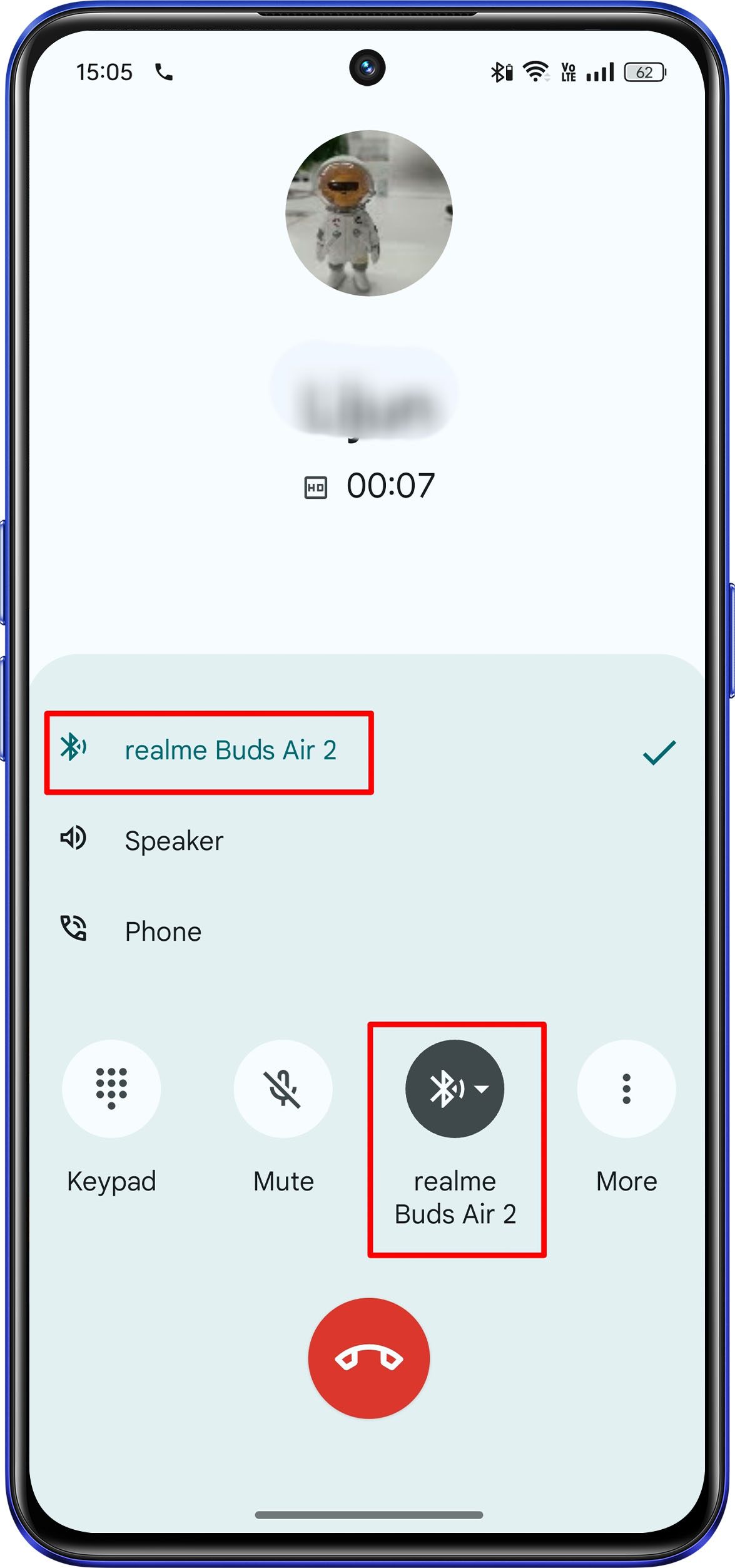
Bluetooth earphones connection during the call


Related Articles:

There is noise when using the Bluetooth earphones

Bluetooth earphones Mic (microphone) not working

Article Reference

Official Realme documented guide #2186452

View on realme.com

Related Topics

#phone sound issue#Bluetooth earphones connectivity issue#fix Bluetooth call audio problems#Bluetooth headset not playing call audio#bluetooth connected but phone sound from speaker

Was this article helpful?

Your feedback helps us improve our support content.

Still need help?

Explore more articles or contact our customer support team for personlized assistance.

Visit Support Hub