PACKING LIST
1. Tag *1
2. realme Adventurer Bandage *1
3. Luggage bag *1
4. Instructions *1
Instructions for TSA coded lock
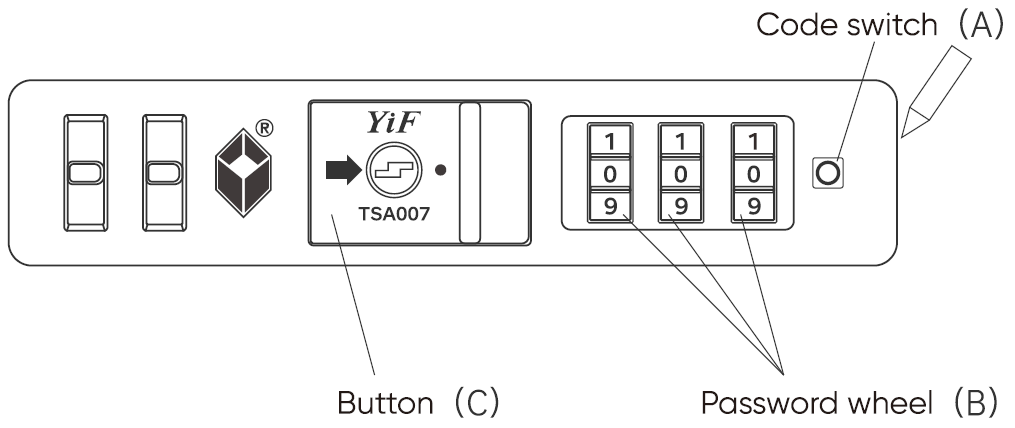
The default password of this lock is 0-0-0. Its user is recommended to reset the password. The specific steps are as follows:
1. Set the lock to on state (the initial password is 0-0-0).
2. Push the code switch (A) with a pen (or other tool) until a tick is heard.
3. Turn the three password wheels (B) and set personal password (e.g. 8-8-8).
4. Push the button (C) in the direction as indicated by the arrow until a tick is heard again. When the code switch (A) extends, the lock is opened.
The setting of personal password is now finished. To reset the password, please repeat steps 1 to 4 according to this method.
Important: If the user forgets the password, the password cannot be reset and the coded lock cannot be opened. The suitcase then cannot be normally opened. So please be sure to remember the password.
Basic parameters
Product Name | realme Adventurer Luggage |
Model | RMT2002 |
Color | Greenland Black |
Atlantic Blue | |
Sahara Yellow | |
Product Dimention (without wheels) | 49.6*35.2*23.5CM |
Product Dimention (with wheels) | 56*37.5*23.5CM |
Net weight | About3.1KG |
Volume | About37L |
Shell | PC |
Lining | polyester fiber |
Package Contents | instructions×1pcs |
Tag×1pcs |