TV Stick is not responding Remote Control when pressing one or several specified buttons
Reason:
1. Foreign objects issue.
2. Broken remote button.
Solution:
Please Clear and remove foreign objects.
TV Stick is not responding to the Remote Control when pressing any buttons.
Reason:
1. Influence of obstruction.
2. Influence of Interference.
3. The distance between the TV stick and the remote is far.
4. Low battery or dead battery.
5. Wrong direction of battery installation
6. Poor contact
7. Abnormal TV stick software
Solution:
1. Please remove the obstruction between the TV and the remote.
2. Please move electronic equipment far from the TV stick.
3. Please reduce the distance between the TV stick and the remote.
4. Please replace a new pair of remote batteries.
5. Please check if the direction of the battery installation is correct, if not, please re-install the batteries.
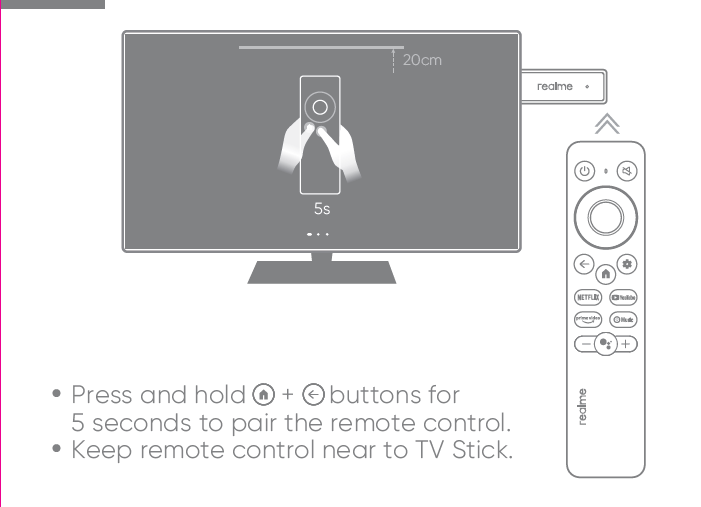
6. Please press and hold the home and ⇠ buttons for 5 seconds. Please repeat the operation several times and keep the remote control close to the TV stick, no more than 20 cm.
7. To resolve this issue, kindly unplug the power cord of the TV stick and disconnect the TV stick from the TV. After waiting for two minutes, reconnect the TV stick to the TV and then plug in the power cord.