realmeparts

Windows 11 taskbar no icons, freezes and unresponsive

1,953 views
6 likes
Official Source
laptop

Problem causes:

This problem is caused by a bug in Windows Explorer and is a known issue of Microsoft Windows 11.


Solution:

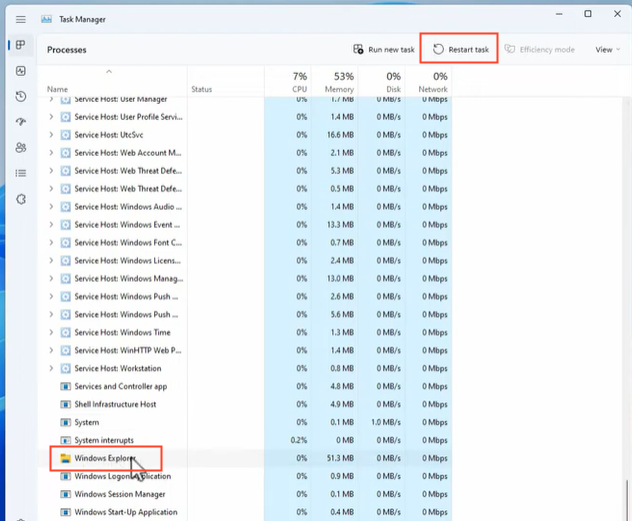
It can be recovered by restarting the computer or re-running explorer.exe

How to re-run the resource manager:

1. Shortcut Ctrl+Alt+Delete to open the Task Manager.
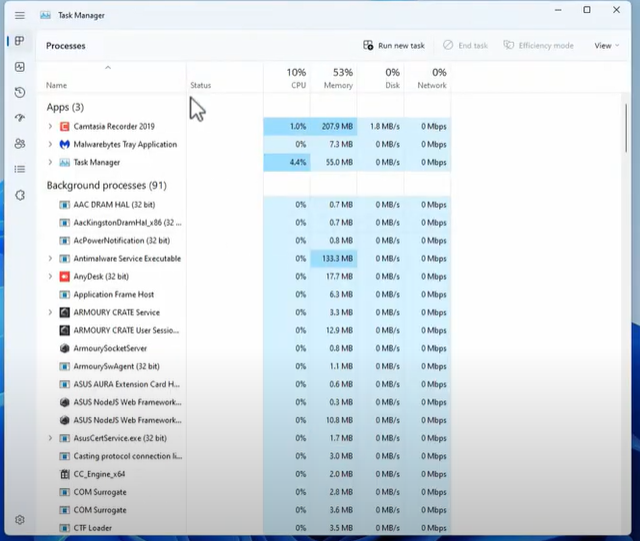
2. Enter explorer.exe and click OK to re-run/re-start the explorer.

Related Articles:

Windows 11 widgets not working- How to Fix

How to reset your Windows 11 laptop


Article Reference

Official Realme documented guide #2053344

View on realme.com

Related Topics

#Windows 11 taskbar freezing#Windows 11 taskbar no icons#Windows 11 taskbar unresponsive#fix taskbar not working in Windows 11#troubleshoot unresponsive windows 11 taskbar#laptop taskbar freezes or unresponsive

Was this article helpful?

Your feedback helps us improve our support content.

Still need help?

Explore more articles or contact our customer support team for personlized assistance.

Visit Support Hub